Showing posts with label BIRT. Show all posts

Tuesday, June 7, 2011

BIRT! Column! Width! Must! Be! Set!

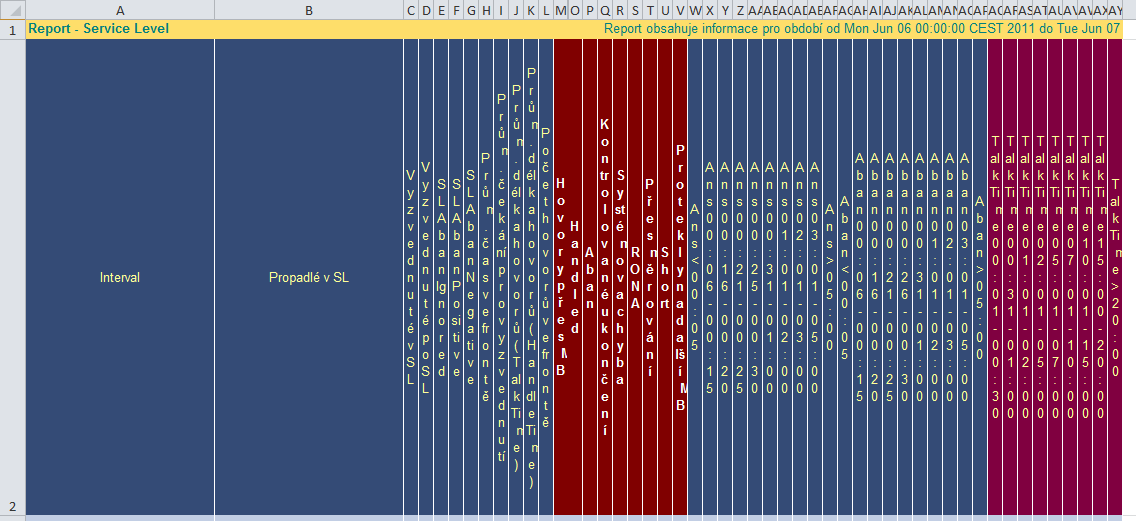
Alright, just to show you how ugly it may look in Excel (I have the 2010 version installed) if a BIRT report does not have the width property set for the column:
Ugly ugly ugly ugly (actually, the first two are alright, they DO have the width set to 40 mm).

It's but a simple change, but the difference is subtle:


Oh, by the way, I tried out the Tribix XLS emitter for BIRT. It actually worked, but I decided to remove it because it created bad looking XLS files.

Monday, January 17, 2011

Dynamically changing datetime format in BIRT

It's really easy to change the format of a datetime data value. One may change the onPrepare function of the data item, and then

switch (params["d1"].value) {
 case "YE": this.getStyle().dateTimeFormat = "YYYY"; break;
 case "MO": this.getStyle().dateTimeFormat = "YYYY MMMM"; break;
 //case "WK": row["dtWeek"]; break;
 case "DY": this.getStyle().dateTimeFormat = "YYYY MMMM DD"; break;
 case "HO": this.getStyle().dateTimeFormat = "YYYY MMMM DD hh:00:00"; break;
 case "HH": this.getStyle().dateTimeFormat = "YYYY MMMM DD hh:mm:00"; break;
 //default: row["dtHalfHour"]; break;
}
So based on the value of the parameter named d1, the report will format the datetime value as year, year and month etc etc.

Friday, December 31, 2010

Scripted data set

Easy. Just create a scripted data source, then attach a data set to it. Its fetch script would look like:

if (XRowNum == 3) {
    row["KEY"] = '1';
    row["VALUE"] = 'Agenti';
    XRowNum--;
    return true;
}
if (XRowNum == 2) {
    row["KEY"] = '2';
    row["VALUE"] = 'Týmy';
    XRowNum--;
    return true;
}
if (XRowNum == 1) {
    row["KEY"] = '3';
    row["VALUE"] = 'SkillGrupy';
    XRowNum--;
    return true;
}
return false;

Friday, December 3, 2010

Dynamic queries in BIRT - query text replacement

var selectedParams = params["calltypes"].value;
var selectedString = "";
for (var counter=0; counter < selectedParams.length; counter++) {
 selectedString += selectedParams[counter] + ",";
}
selectedString = selectedString.substring(0,selectedString.length-1);
var before = this.queryText.toString();
var injection = "";
injection =  selectedString;
this.queryText = before.replace('53279',injection);

Friday, October 1, 2010

Number format and report title in BIRT, programmatically

Like this:
if (params["forexport"].value == 'n') {
this.getStyle().numberFormat = "Percent";
this.helpText = reportContext.getDesignHandle().title;
}

Tuesday, August 17, 2010

Dynamic query in BIRT

Pretend, I have a dataset backed by the following SQL query:

select
COUNT(*)
from ipcc_baA.dbo.Personal_Callback_List pcl
where pcl.FirstName IN ('something')
and pcl.CallStatus <> 'C'

and a parameter, named cctype, type String, returning either value 'HIM' or 'AB'. No duplicate values.

Based on the parameter value, I want to change the query text. For instance, write something into the IN clause within the brackets. Or, change a whole row.

A not elegant, but working way is: using the dataset's beforeOpen method, like this:

if (params["cctype"].value == 'HIM') {
 var inject = '\'H1\',\'H2\',\'H3\',\'H4\',\'I\',\'M\'';
 this.queryText = this.queryText.replace('\'INJECT\'',inject);
}
if  (params["cctype"].value == 'AB') {
var inject = 'where pcl.AlternateVDN IN (\'reserveA1\',\'reserveA2\',\'reserveA3\',\'reserveB1\',\'reserveB2\')';
 this.queryText = this.queryText.replace('where pcl.FirstName IN (\'INJECT\')',inject);
}
}

And of course, modifying the query itself:

select
COUNT(*)
from ipcc_baA.dbo.Personal_Callback_List pcl
where pcl.FirstName IN ('INJECT') --neupravovat!!!
and pcl.CallStatus <> 'C'

And voilá, it works. Of course, one should take extra care not to change the original query, otherwise the replace method won't find the needle in the haystack.

The query, in the data set
The beforeOpen method

Wednesday, August 4, 2010

Finding BirtDateTime

I noticed this today: if the SQL dataset column type is DATETIME, and you set it to DateTime in BIRT as well, the report will show it like this (for 2nd August, 2010 00:00:00, Central European Summer Time):

Mon Aug 02 00:00:00 CEST 2010

This is not something Javascript can accept - although I tried the toLocaleString() method and it worked. However, I just needed the date part. toLocaleDateString() did not show anything.

This is where I tried the BirtDateTime class; it accepts the DateTime strings nicely. Now I can do this for instance:

BirtDateTime.day(row["Day"]) + '. ' + BirtDateTime.month(row["Day"],2) + ' ' + BirtDateTime.year(row["Day"]) 

It will show (provided the browser locale is set to Czech):
2. srpna 2010

Thursday, November 26, 2009

My First Script in BIRT

Yeah, I got it finally. I added a piece of ECMAScript to a BIRT report. Actually, it just does one very simple thing: highlighting one row if the value of a column fulfills a condition.

Created a datasource (MySQL database on my computer) and a dataset. Business as usual, nothing fancy. The dataset is actually a table consisting of two columns, one is the primary key, the second is the value.
On the Layout tab, I clicked the value column's value row, and just added this code to the onRender method (the Help says: "Script executed when the element is prepared for rendering in the Presentation engine"):

var val = this.getValue();
if (val == "boo") {
this.getStyle().backgroundColor = "#AAAAAA";
}

And voilá:


This BIRT thing is not bad, after all.